Introduction
The Sonos Widget lets you bring your Sonos smart speakers into the Wondrwall App, giving you quick access to music and radio alongside your heating, lighting and security. Whether you want background music in the kitchen or to pause all playback when leaving home, the widget keeps your audio control simple and centralised.
How to Access your Heating Overview Screen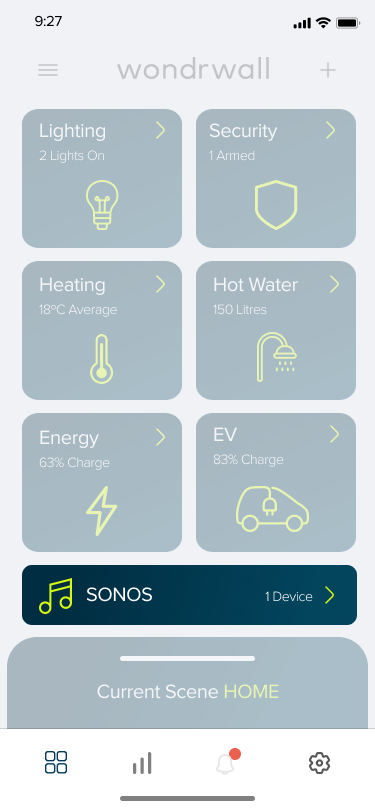
Here is an image of the Wondrwall app’s home screen when you are logged into your home. The highlighted box displays your Sonos Widget. This widget shows the The number of active devices and allows you to access your Sonos Overview Screen. Below are the steps to access the Sonos Overview Screen.
Steps:
- Open the Wondrwall app. If you are logged into your home system, then you will be auto-directed to the home screen. Here you will see a grid of different widgets, each controlling a different part of your Wondrwall system
- Tap the Sonos Widget on the Wondrwall app homepage
- You will now see your Sonos Overview Screen
Note: Some of the widgets on the Wondrwall home screen may be greyed out. This means you do not currently have any of the associated Wondrwall devices paired.
The Sonos Overview Screen
Each speaker appears as a bar. On this screen you can see:
-
Current playback: track, podcast or radio station depending on your choice. This can be different for each room you have a device in
-
Playback status: playing or paused.
-
When playing, the bar will appear navy with lime green buttons.
-
When paused the bar will appear grey with dark grey buttons.
-
-
The Room name
-
Quick controls: Play/Pause, Skip, and Volume
You can access the full playback screen by tapping one of the room bars
Navigating to The Playback Screen
Steps:
- From the Wondrwall homescreen, tap the Sonos Widget
- Tap on the room speaker you wish to control by selecting the corresponding room bar
- You are now on the Playback Screen
The Playback Screen
On this screen you can see:
-
Album artwork or station logo
-
Track or station name and artist
-
Timeline slider (for music or podcasts)
-
Shuffle and Repeat toggles (when available)
-
Control bar with Play/Pause, Skip, and a Volume slider
All information is pulled directly from your Sonos system and updates in real time.