Summer Mode
Summer Mode is designed to intelligently manage your heating system during warmer months. The Wondrwall app makes it so that a single tap can prevent unnecessary heating, keeping your home energy efficient, while keeping your towel radiators active for comfort.
What does Summer Mode do?
When summer mode is switched on:
- All heating device schedules (except towel rails) are disabled (see below for information about schedules)
- The target temperature for all heating zones is automatically set to 12 °C, our minimum frost protection setting.
When summer mode is switched off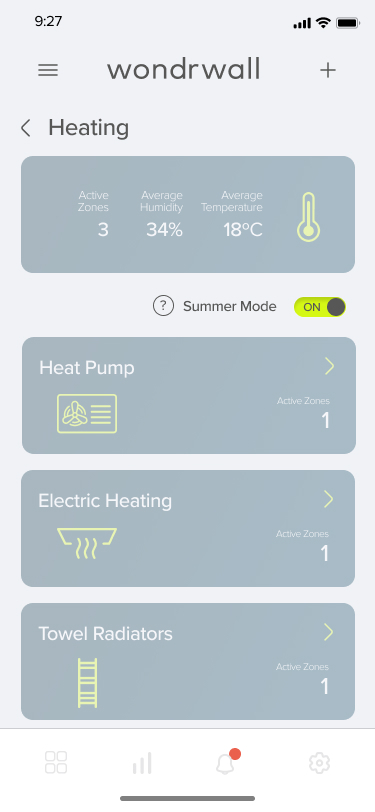
- All heating schedules are re-enabled
- The target temperature in each zone will update based on your schedules, either your comfort temperature or your saving temperature. (See below for information on Heating Schedules)
Switching on Summer Mode
Steps
- Open your Wondrwall app
- Tap the Heating Widget to bring you to the Heating Overview Screen
- On the Heating Overview Screen, you will see an on and off icon for “Summer Mode”
- To switch Summer Mode on, tap the icon to turn off your heating around your house. When Summer Mode is switched on, the icon will display “ON” and will turn lime green. The icon is highlighted in the adjacent image
- To switch Summer mode off, tap the icon again, and it will display “OFF” and turn grey.